



Errors
A node fails when it can't compute its outputs from its inputs: a range whose minimum is above its maximum, an index past the end of an array, a shape without an outline for a path node… The Playground marks the node and keeps drawing the rest.
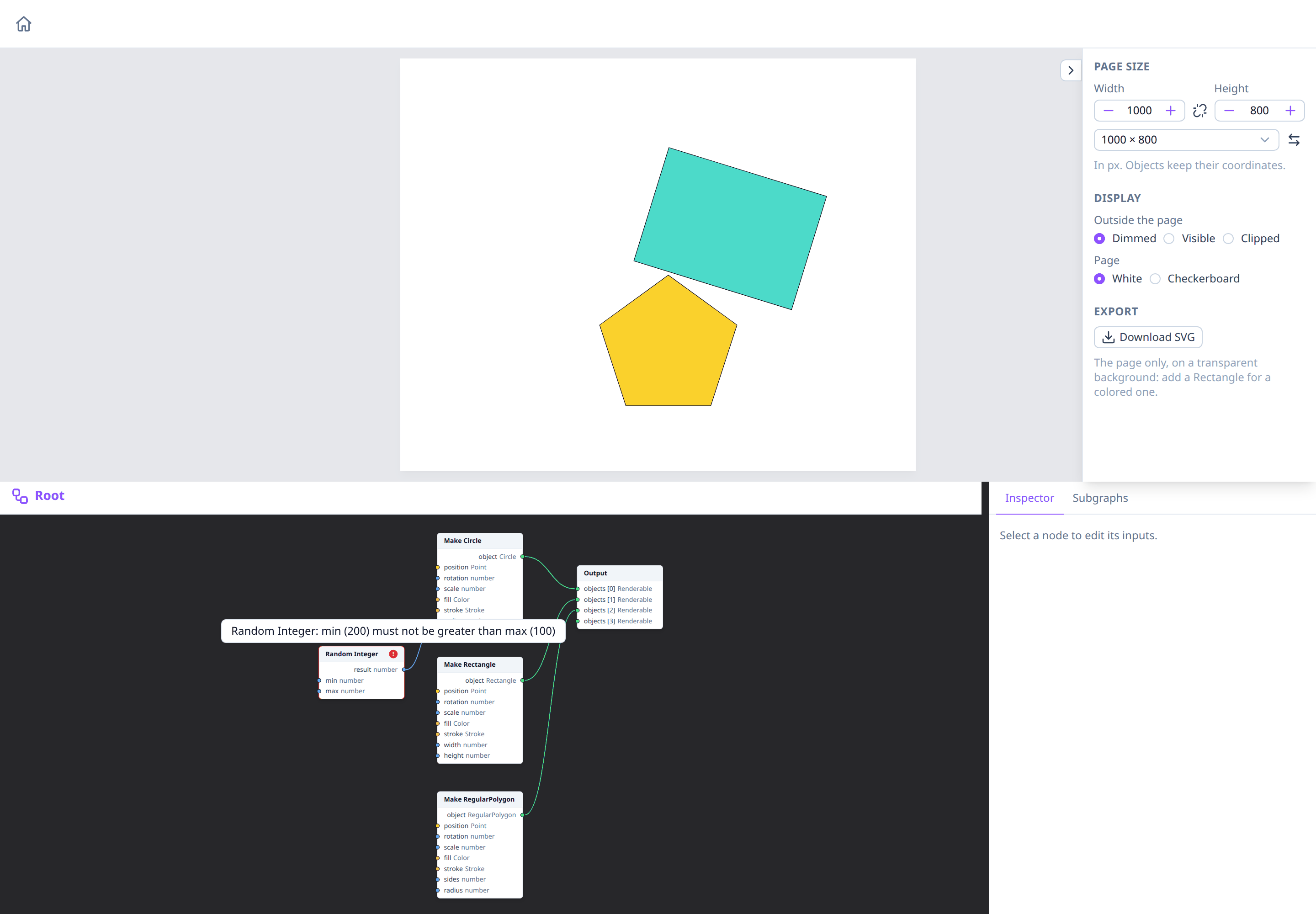
The node mark
A failing node gets a red border and a red ! badge in its header. Hover over the badge to read the error.
Only the node that failed is marked. The nodes that depend on it are skipped: in the picture, Make Circle gets no radius, so no circle is drawn. Everything else connected to the Output is still drawn.
Only nodes connected to the Output, directly or through other nodes, are evaluated: a node that isn't connected shows no error, even with wrong inputs. See Dataflow and the Output node.
The mark goes away as soon as the node succeeds again, e.g. after fixing its inputs in the property inspector, or when the node is deleted.
Errors of the whole graph
Errors that no single node is responsible for show in the top-left corner of the image area, such as a graph without an Output node. Since the Playground always keeps its Output node, these are rare.
The same corner warns, in orange, about objects the preview can't draw
because their geometry isn't a finite number: for example a rotation
computed by dividing by zero, such as a
Modulo node left with its default b of 0.
Math nodes follow JavaScript and give NaN or Infinity there rather than an
error, so no node is marked: the warning only says how many objects were
skipped. These objects are left out of the
downloaded SVG too, and
the Image drawer repeats the warning next to Download SVG. It goes away
once the values are finite again.
Errors inside subgraphs
A node that fails inside a subgraph's body marks the node that called the subgraph (such as Map). Open the body to see which node failed: see Errors inside a body.
Connections that are refused
A wire that can't be made (incompatible pins, or one that would loop back into its own node) isn't an error of the graph: nothing changes, and a message says why. See Connecting pins.
See also
- Dataflow and the Output node.
- Nodes: node pages describe the errors each node can report.