



Context menus
The right-click actions for nodes, wires and empty canvas.
Right-click in the graph editor to open a menu of actions for what is under the pointer: a node, a wire, a frame's title bar, or empty canvas.
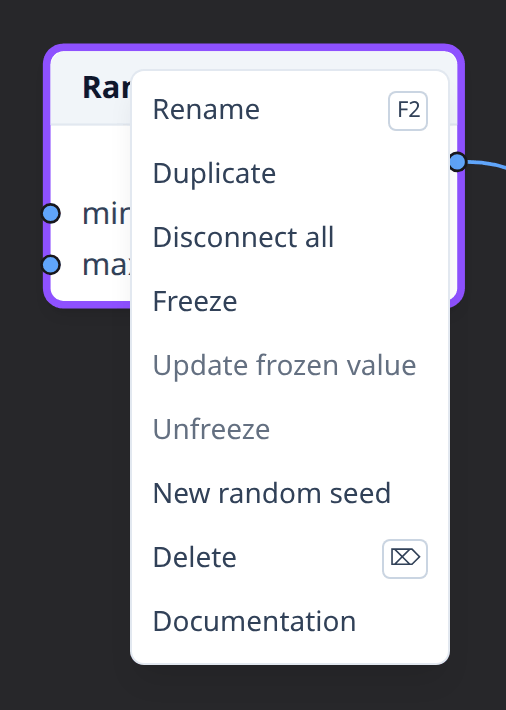
What the actions apply to
If the node, wire or frame under the pointer isn't selected, it becomes the selection. If it's already selected, the actions apply to the whole selection, and their labels show how many nodes they affect.
Actions that don't apply are shown, disabled.
Nodes
- Rename (one node only, also F2) edits the node's name in its header; see Renaming nodes.
- New function… (Map, Filter, Reduce and Repeat, while their
functioninput is free) creates a fitting subgraph, connects its function node and opens it; see New function…. - Duplicate adds copies of the nodes, with the same settings, slightly offset and without wires. The copies become the selection. The Output node can't be duplicated.
- Cut and Copy (also Ctrl+X and Ctrl+C) copy the nodes and the wires between them; Cut then deletes them. The Output node can't be copied; see Cut, copy and paste.
- Create subgraph from selection moves the nodes into a new subgraph and puts a node using it in their place; see Subgraphs.
- Frame selection (also Ctrl+G) draws a titled frame around the nodes, and Remove from frame takes them out of their frames; see Frames.
- Disconnect all removes every wire of the nodes.
- Freeze, Update frozen value and Unfreeze keep a node's value as it is, refresh it, or go back to computing it; see Freezing nodes.
- New random seed gives each random node of the selection (Random Number, Random Integer, Random Color, Noise, Displace) a new seed of its own, so it draws other values; see seeds.
- Delete removes the nodes and their wires (also Delete or Backspace). The Output node can't be deleted.
- Documentation (one node only) opens the node's reference page in a new tab, so the graph stays open.
Wires
- Delete removes the selected wires.
Frames
- Rename (also F2) edits the frame's title.
- Collapse frame or Expand frame folds the frame to its title bar or shows what's inside again; see Collapsing.
- Color picks the frame's color; see Frames.
- Frame selection (also Ctrl+G) puts the selected frames in a new frame, and Remove from frame takes them out of the frame they're in; see Frames inside frames.
- Delete frame removes the frame and keeps its nodes.
Empty canvas
- Add node… opens the add-node menu; the node goes where you clicked.
- Paste (also Ctrl+V) adds the copied nodes where you clicked.
- Select all selects every node.
See also
- Navigating the editor, for selecting.
- Frames.