



Voronoi tessellation
Voronoi tessellation splits an area into cells around a collection of points, where each cell covers the region closer to its point than to any other. In this example, you'll start with points on a grid, jitter them into a random cloud, use Relax Points (Lloyd relaxation) to even them into a honeycomb pattern, generate the cells with Voronoi, and scale each cell to leave gaps between them.
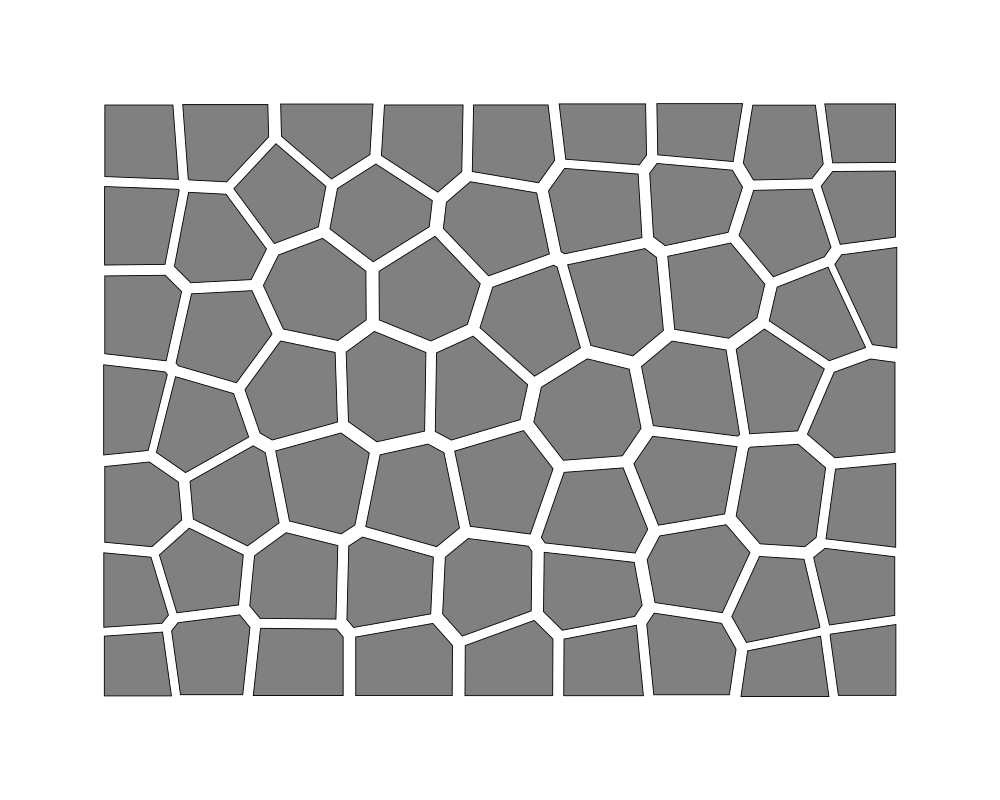 Open in Playground
You'll use: Make BoundingBox, Orthogonal Grid, Map (New function…), Break Point, Random Number, Add, Make Point, Relax Points, Voronoi, Scale, Output.
Steps
1. Generate jittered points
Add a Make BoundingBox node (Objects → BoundingBox → Make BoundingBox) and set:
topLeft: x 100, y 100;bottomRight: x 900, y 700.
Add an Orthogonal Grid node (Lattice → Orthogonal Grid) and connect the
box's object to its area. Set its x and y spacing to 100.
Add a Map node (Array → Map) and connect the grid's points to its array.
Drag a wire from Map's function input to empty canvas and choose New function….
Inside the function body (Root › Map function):
- Add a Break Point (Objects → Point → Break Point) and connect Graph Input's
elementto itsobject. - Add two Random Number nodes (Math → Random Number), each with
min−35 andmax35. - Add two Add nodes (Math → Add): connect
element.xand the first random number to one, andelement.yand the second random number to the other. - Add a Make Point node (Objects → Point → Make Point) and connect the
two sums to its
xandy. - Select Graph Output, change the type of
resultfrom number to Point, and connect the new point'sobjecttoresult.
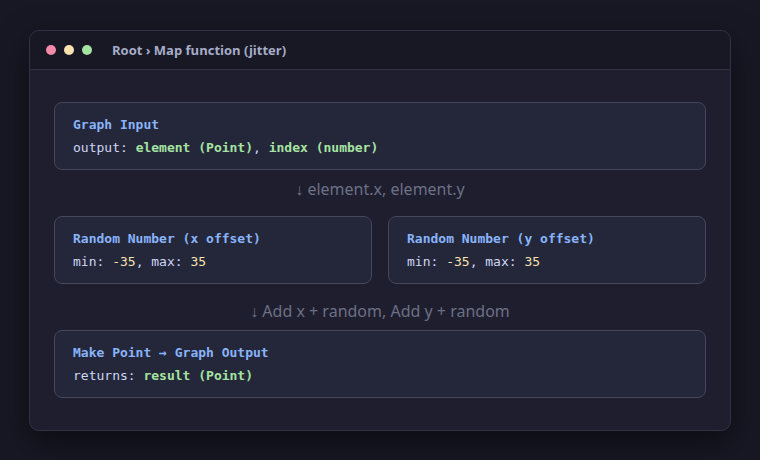
Return to Root. The Map node now outputs an array of jittered points.
2. Smooth with Relax Points
Add a Relax Points node (Tessellation → Relax Points). Connect the
box's object output to its area, Map's array output to its points,
and set iterations to 3.
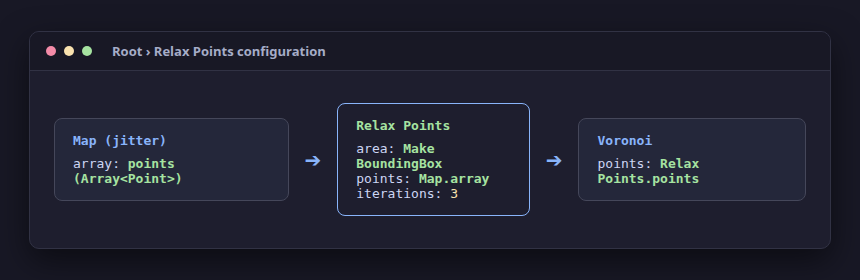
Relax Points applies Lloyd relaxation: in each iteration, every point moves to the area centroid of its Voronoi cell. Over 3 iterations, the chaotic jittered points even out into a harmonious, honeycomb-like distribution.
3. Generate Voronoi cells
Add a Voronoi node (Tessellation → Voronoi). Connect the box's object
output to its area, and Relax Points' points output to its points.
Voronoi outputs cells, an array of Polygon shapes covering the area.
4. Scale cells to create gaps
Add a second Map node (Array → Map) and connect Voronoi's cells
output to its array.
Drag a wire from Map's function input to empty canvas and choose New function….
Inside the new function body:
- Add a Scale node (Transform → Scale). Connect Graph Input's
element(type Polygon) to itsobject, and setfactorto 0.88. - Select Graph Output, change the type of
resultfrom number to Polygon, and connect Scale'sobjectoutput toresult.
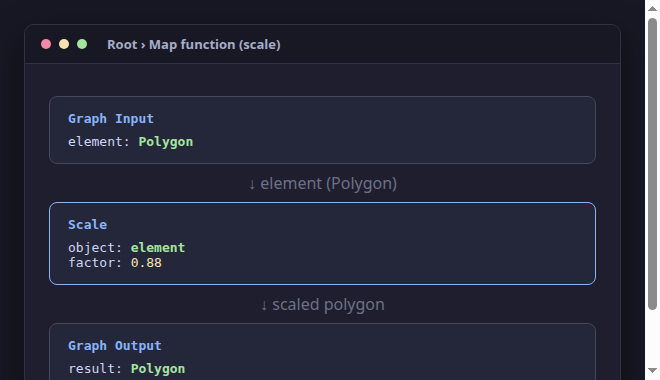
Return to Root. Connect Map's output array to the Output node's objects.
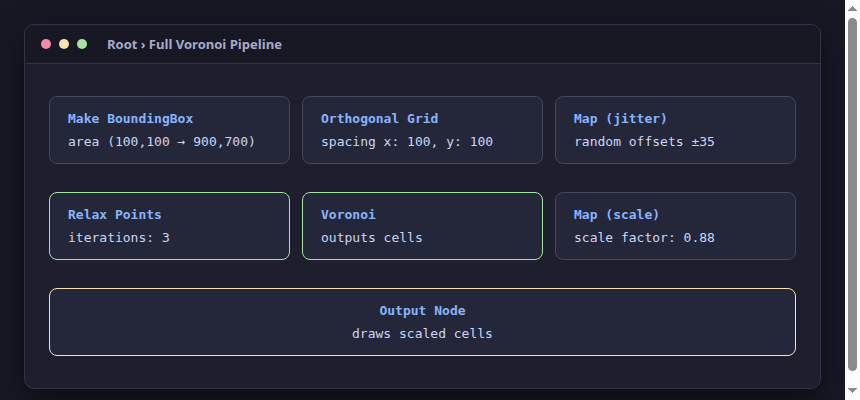
Because each Voronoi cell polygon's position is set to its area centroid,
Scale shrinks each polygon around its own center, leaving uniform gaps
between adjacent cells. The result is the mosaic at the top.
How it works
- Jittering: Grid points are perfectly aligned. Adding a small random offset
to each point's
xandybreaks the regular grid into an organic cloud of points. - Relaxation: Raw random points produce cells of very uneven size. Relax Points moves points toward the centroids of their cells, rapidly converging toward an even centroidal Voronoi tessellation.
- Centroid transforms: Each returned cell polygon's transform position is its area centroid. When Scale acts on a polygon, it scales around that centroid, shrinking each cell toward its middle and creating neat gaps between neighbours.
Nodes used
- Make BoundingBox, Break Point, Make Point, and Polygon, on their types' pages.
- Orthogonal Grid.
- Map.
- Random Number and Add.
- Relax Points.
- Voronoi.
- Scale.
- Output.
Variations
- Adjust iterations: Change
iterationson Relax Points to 0 for a raw jittered pattern, or to 10 for highly uniform cells. - Custom cell styling: Inside the cell-scaling function, add a Set Polygon
node to style each cell's
fillcolor using HSL or random colors. - Points outside the area: Try adding points outside the bounding box. They will shape border cells, and Relax Points will pull them into the area.