



Lattice
The points of a grid along any two directions, inside an area.
Node id lattice/basis
The Lattice node outputs the points of a grid spanned by two vectors, a
and b, that fall inside area. Every point is the area's top-left
corner plus a whole number of a steps and a whole number of b steps.
Slanted, rotated or stretched grids are all lattices.
Inputs
| Name | Type | Default | Notes |
|---|---|---|---|
| area | BoundingBox | — | |
| a | Vec2 | { x: 100, y: 0 } | |
| b | Vec2 | { x: 0, y: 100 } |
Outputs
Behaviour
- Directions.
adefaults to (100, 0) andbto (0, 100), which gives the same grid as Orthogonal Grid. Other choices:- a = (100, 0), b = (50, 86.6): the equilateral triangle grid;
- a = (120, 40), b = (-40, 120): a square grid, rotated;
- a = (100, 0), b = (30, 100): a slanted grid.
- Origin. The area's top-left corner is always a point of the grid. Points on the area's edges are included.
- Order. Points come line by line along
b, the lines ordered alonga.
Errors
areamust be connected.aandbmust point in different directions: if one is a multiple of the other (or zero), they span no grid.- An area holding more than 100 000 grid positions is an error, which also catches vectors that are almost parallel. Use longer vectors or a smaller area.
Example
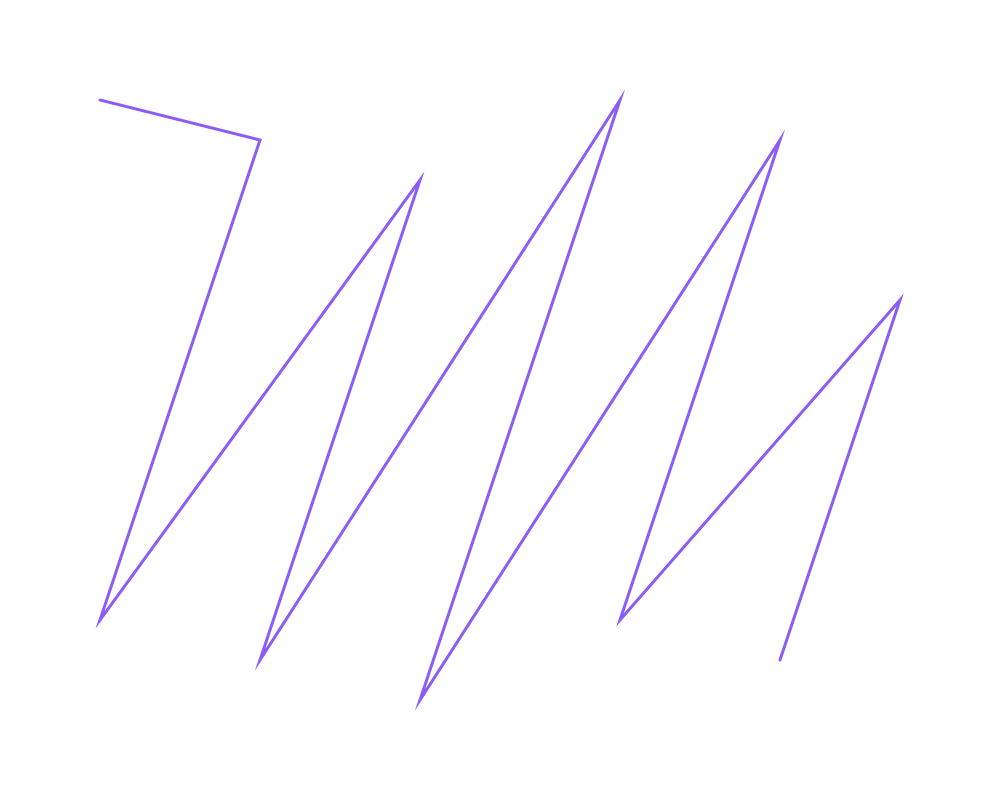
A lattice with a = (160, 40) and b = (-40, 120) in an 800 × 600 area, drawn as a polyline through its points: a rotated, stretched grid.
 Open in Playground
Related nodes
- Orthogonal Grid and Equilateral Triangle Grid: the common grids, with simpler inputs.
- Vector From Angle and
Multiply Vector: build
aandbfrom an angle and a length.