



Units and coordinates
Page coordinates, angles in radians, local and page positions, and the ranges of t, colors and lerps.
All numbers in a graph are plain numbers: no units are written. This page lists what they mean.
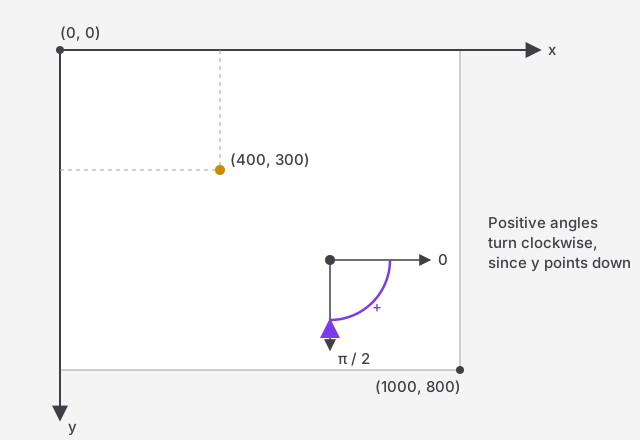
The page
- The page is 1000 × 800 units by default, drawn as it is in the image area. Its size is set in the Image drawer; objects keep their coordinates when it changes. A page unit is a pixel of the downloaded SVG.
- (0, 0) is the top-left corner. x grows to the right, y downwards.
- The Page node gives the page as a box, so a graph can follow its size, e.g. to centre a shape on it.
- Anything outside the page isn't part of the image: the preview shows it dimmed (or as set in the drawer), and the downloaded SVG cuts it off.
Angles
- Angles are in radians: a full turn is 2π (about 6.283), a right angle π / 2. Use the Pi node rather than typing digits.
- 0 points to the right. Since y points down, positive angles turn clockwise.
- This applies everywhere:
rotation, arcs, Rotate, Vector From Angle, and the trigonometry nodes.
Position, rotation and scale
Every shape, line and group has a position, a rotation and a scale.
- A shape is drawn around its position: a circle or a rectangle is centred on it.
- It turns and scales around its position, too.
scaleis one factor for both directions: 1 keeps the size, 2 doubles it.
Local and page coordinates
An object's own points (a polygon's vertices, a segment's ends, a curve's control points) are local: relative to its position, before rotation and scale. Moving the object moves them all.
Nodes that measure objects give page coordinates, as drawn: the path nodes (Point At, Sample, Segments) and AABB. OOBB gives both: the object's own box, in local coordinates, and its corners on the page.
The children of a group are local to the group in the same way.
t: a fraction from 0 to 1
Many nodes take a t for "how far": 0 is the start, 1 the end.
| Node | t outside 0, 1 |
|---|---|
| Point At | clamped to the start or end |
| Lerp Type (Lerp Circle, Lerp Color…) | clamped: never past a or b |
| Lerp (numbers) | not clamped: extrapolates past a and b |
Colors
- Color channels
r,g,bgo from 0 to 255; alphaafrom 0 (transparent) to 1 (opaque). - The HSL color nodes use fractions from 0 to 1 for hue, saturation and lightness. Hue wraps around: 1.25 is the same hue as 0.25.